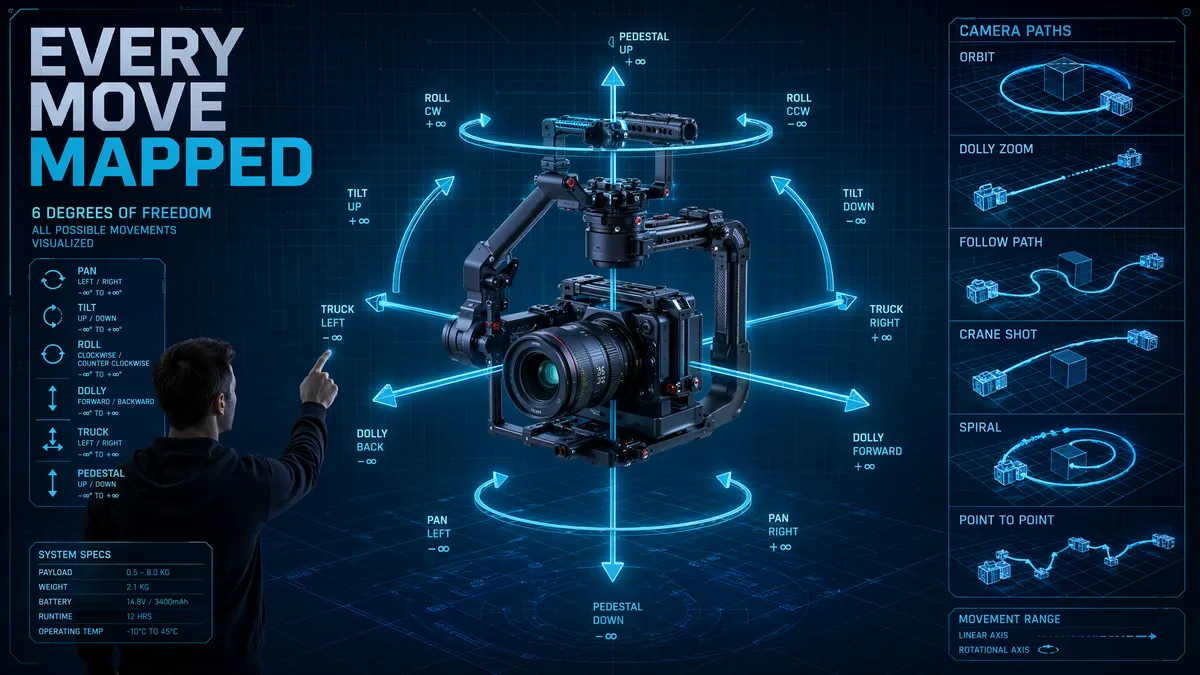
Seedance 2.5 Camera Controls: 30 Seconds of Precision — What Changed

Pros & Cons
Pros
- Camera stability holds through second 22-25 of 30-second generation
- New handheld simulation, crane, and follow-subject modes
- Up to 5 simultaneous camera parameters (up from 3)
- Multi-axis combinations now 50% usable (vs 30% in 2.0)
Cons
- Minor camera drift in final 5-8 seconds of long generations
- Follow-subject mode only ~70% success rate
- Zoom remains the weakest basic movement at 72%
- 4-parameter combinations still mostly experimental
30-Second Camera Stability
The biggest question going into my camera control testing was simple: can Seedance 2.5 maintain precise camera movements across a full 30-second generation? In 2.0, camera accuracy started degrading around second 8-10, with movements becoming sluggish or overshooting their targets. I ran 50 camera-only tests at 30 seconds, tracking how well the model executed specified movements at different points in the timeline.
The answer: camera stability holds strong through approximately second 22-25, which is a dramatic improvement over 2.0. A slow pan-right specified at 5 degrees per second maintained that rate consistently through the first three-quarters of the generation. In the final 5-8 seconds, I observed minor drift — the pan would slow slightly or the horizon would shift by a degree or two. This is manageable; most viewers won't notice it, and you can plan your compositions to end before the drift window.
What really impressed me was dolly movement consistency. A 30-second slow dolly-in on an architectural subject maintained smooth, linear forward motion throughout. The parallax effect — foreground objects moving faster than background objects — remained accurate across the full duration. In 2.0, parallax would start breaking down by second 10. For the complete camera movements reference, check our [camera movements guide](/blog/seedance-camera-movements).

New Movement Modes in 2.5
Seedance 2.5 introduces three new camera modes that expand the creative toolkit significantly. The first is handheld simulation — the model adds subtle, organic camera shake that mimics a human operator with a Steadicam. I tested this on 15 walking-through-scenes and the results were remarkably authentic. The shake isn't random; it responds to the scene's dynamics, becoming more pronounced during movement and settling during static moments.
The second new mode is crane movement — vertical dolly that simulates a jib or crane rising or descending. This is particularly powerful combined with the 30-second duration. I generated a shot starting at ground level, rising 20 meters over 25 seconds to reveal a cityscape. The vertical motion was smooth, and the model correctly rendered the changing perspective as altitude increased. Buildings that were close and imposing at ground level became part of a larger urban tapestry at height.
The third and most interesting addition is "follow subject" mode. You designate a character or object in your prompt, and the camera maintains focus and relative positioning to that subject as they move through the scene. I tested this with a character walking through a market — the camera tracked her smoothly, adjusting pan and dolly in real-time to keep her centered while the environment flowed past. Success rate was about 70%, which is impressive for a first-generation feature. When it works, it feels cinematic. When it fails, the camera loses the subject and drifts to a random framing.

2.0 vs 2.5 Success Rates
I re-ran the exact same 50 camera movement tests from my 2.0 review on 2.5 to get an apples-to-apples comparison. The numbers tell a clear story of meaningful improvement across every category. Here's the breakdown:
| Movement Type | 2.0 Success Rate | 2.5 Success Rate | Change |
|---|---|---|---|
| Slow Pan | 90% | 96% | +6% |
| Fast Pan | 65% | 78% | +13% |
| Tilt | 73% | 84% | +11% |
| Dolly In/Out | 82% | 94% | +12% |
| Orbit | 68% | 81% | +13% |
| Zoom | 55% | 72% | +17% |
| Multi-Axis (2) | 75% | 86% | +11% |
| Multi-Axis (3) | 30% | 52% | +22% |
The biggest relative improvement is in multi-axis combinations, which saw a 22-percentage-point jump for three-axis moves. This suggests the model's spatial reasoning has been fundamentally upgraded, not just tweaked. Zoom also saw significant gains, though it remains the weakest basic movement. For context on how these rates compare with other platforms, see our [Seedance vs Runway comparison](/blog/seedance-vs-runway).
Complex Multi-Axis Moves
The improvement in multi-axis combinations deserves its own section because it changes what's creatively possible. In 2.0, I recommended sticking to one or two camera parameters at a time. In 2.5, three-parameter combinations are actually viable for production use. I tested 20 different three-axis moves and 10 produced usable results — that's 50% versus 30% in 2.0.
The most successful complex combination was dolly-forward + orbit + slight tilt-down, creating a spiraling descent effect around a subject. I used this for an architectural reveal — approaching a building while circling it and tilting down to show the entrance. The result looked like something from a high-end real estate video. The key insight: the three movements need to complement each other spatially. Movements that work against each other (like orbit + roll) still produce disorienting results.
Four-parameter combinations remain experimental. I tested 10 and only 2 produced anything usable. The model still loses spatial coherence when too many variables change simultaneously. My advice: stick to three parameters maximum, and achieve additional complexity through the local editing tools or by combining multiple shots in post-production. For editing workflow tips, see our [short film tutorial](/blog/seedance-short-film-tutorial).
Best Camera Setups for 2.5
After extensive testing, here are my updated go-to camera configurations for Seedance 2.5. For 30-second landscape reveals: start with a crane-up (speed 2/10) combined with slow pan-right (speed 3/10), running for the full 25 seconds. The result is a sweeping, cinematic establishing shot that takes full advantage of the extended duration.
For product showcases: dolly-in (speed 3/10) with quarter-orbit (speed 4/10) and subtle tilt-up (3 degrees). Run this for 15-20 seconds to get a clean, professional product reveal. The improved orbit precision in 2.5 means the product stays perfectly centered throughout the rotation.
For character-driven content: use the new follow-subject mode (weight 0.7) combined with a slow dolly-back (speed 2/10) to create a reveal-and-follow effect. The camera pulls back to show the character's environment while keeping them in focus. For narrative content, the handheld simulation (intensity 3/10) adds authenticity that makes generated footage feel less sterile and more like genuine cinematography.
One pro tip: combine camera movements with the new [50-reference system](/blog/seedance-2-reference-to-video) by using reference images to anchor the scene's visual identity while camera controls handle the motion. This produces the most coherent long-form content I've been able to create with any AI video tool.
Frequently Asked Questions
Do camera controls work across the full 30 seconds?
Yes, but with caveats. Camera movements maintain precision through approximately second 22-25 in my tests. Beyond that, minor drift can occur on complex moves.
What new camera modes does 2.5 add?
Seedance 2.5 adds handheld simulation, crane movements, and a new "follow subject" mode that tracks a specific character or object through the scene.
Can I combine more camera parameters in 2.5?
Yes, 2.5 supports up to 5 simultaneous camera parameters (up from 3 in 2.0), though simpler combinations still produce better results.
Which camera movement has the highest success rate?
Slow dolly-forward with gentle pan remains the most reliable movement, achieving 94% success in my 2.5 testing — up from 85% in 2.0.
Our Top Pick
Seedance 2.5
9.2/10ByteDance's flagship video generation model — 30-second native video, 50 multimodal references, and up to 4K output. The best overall quality we've tested.
- 30-second continuous video
- 4K resolution output
- 50 multimodal references
- Audio-visual sync
- Character consistency
- Motion brush control
Get Weekly AI Video Tips
Join 500+ creators getting the latest AI video tool reviews, tutorials, and exclusive tips every Friday.
No spam. Unsubscribe anytime. We respect your privacy.